BOOMSCROLLING / THE BASIC IDEA
You’re scrolling anyway.
Leave with a post.
BoomScrolling helps you turn a little of the scrolling you already do into something for your own page.
You read a real post. You look at a suggested response. Pick one you like, change it until it sounds like you, then choose whether to post it on your own X account.
That’s the idea. We already spend all this time reading, liking and quietly having opinions. A little of that attention could become something of our own.
It’s like drinking Coca-Cola, but you’re using it to run sprints. You were going to have the Coke. Give some of that energy a job.

What happens on screen?
- Read a post. Find something you have a thought about.
- Pick a suggested response. It gives you somewhere to start.
- Make it sound like you. Change a word, rewrite the whole thing, or throw it away.
- Choose what to share. Post, check it there and send it yourself.
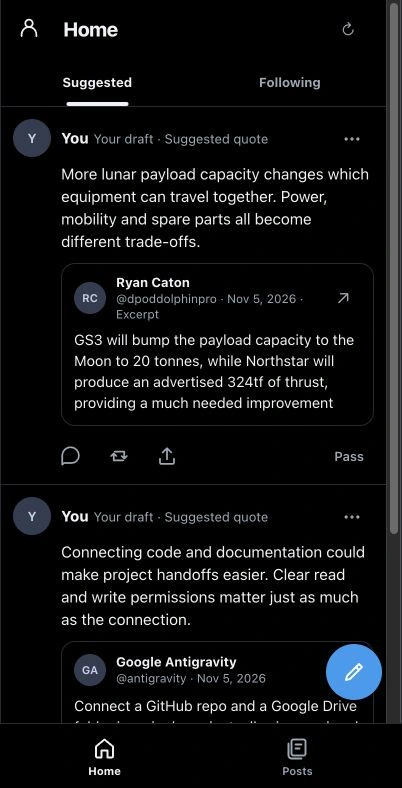
Here’s a real starter example. Someone posts about taking more equipment to the Moon. One suggested response asks whether there’s finally room for a forklift.
You might keep that joke. You might have a serious question about unloading the equipment. You might think of a better line.
Who makes the content?
The original posts are by people on X. Their names and original conversations stay attached. The suggested responses are AI-assisted drafts. You bring the judgment and choose what goes out under your name.
Sometimes a draft helps because you disagree with it. “Well, I wouldn’t say that. I’d say this.” Now you’ve got somewhere to start.
That’s the bit I want to recycle: some of the time and attention we were already spending.
Try it with one post.
Start free with a private feed, your own supported AI agent and 100 new drafts each calendar month. BoomScrolling ($5/month) and Pro ($20/month) add more drafts and bounded X Following reads. Bring your own model access. The preview opens with a small prepared selection of real posts and written response options. You can try it without signing in. Sign in with ChatGPT when you want to save drafts.
Your live personal feed isn’t connected in this preview. Nothing posts automatically. You edit the draft and review it in X yourself.
Keep one response, fix one, throw one away. Then tell me what you’d change.
Watch an edit, a save and a Post
Read a real post. Edit the suggested response, save your words, then choose Post. Copied confirms the copy; review and send on X yourself.